Manufacturing Workflow Automation in India: How SMEs Can Replace Excel-and-WhatsApp Coordination
This guide reveals actionable strategies to replace manual coordination with affordable workflow automation, helping you cut down errors, boost production capacity, and scale your manufacturing business seamlessly.
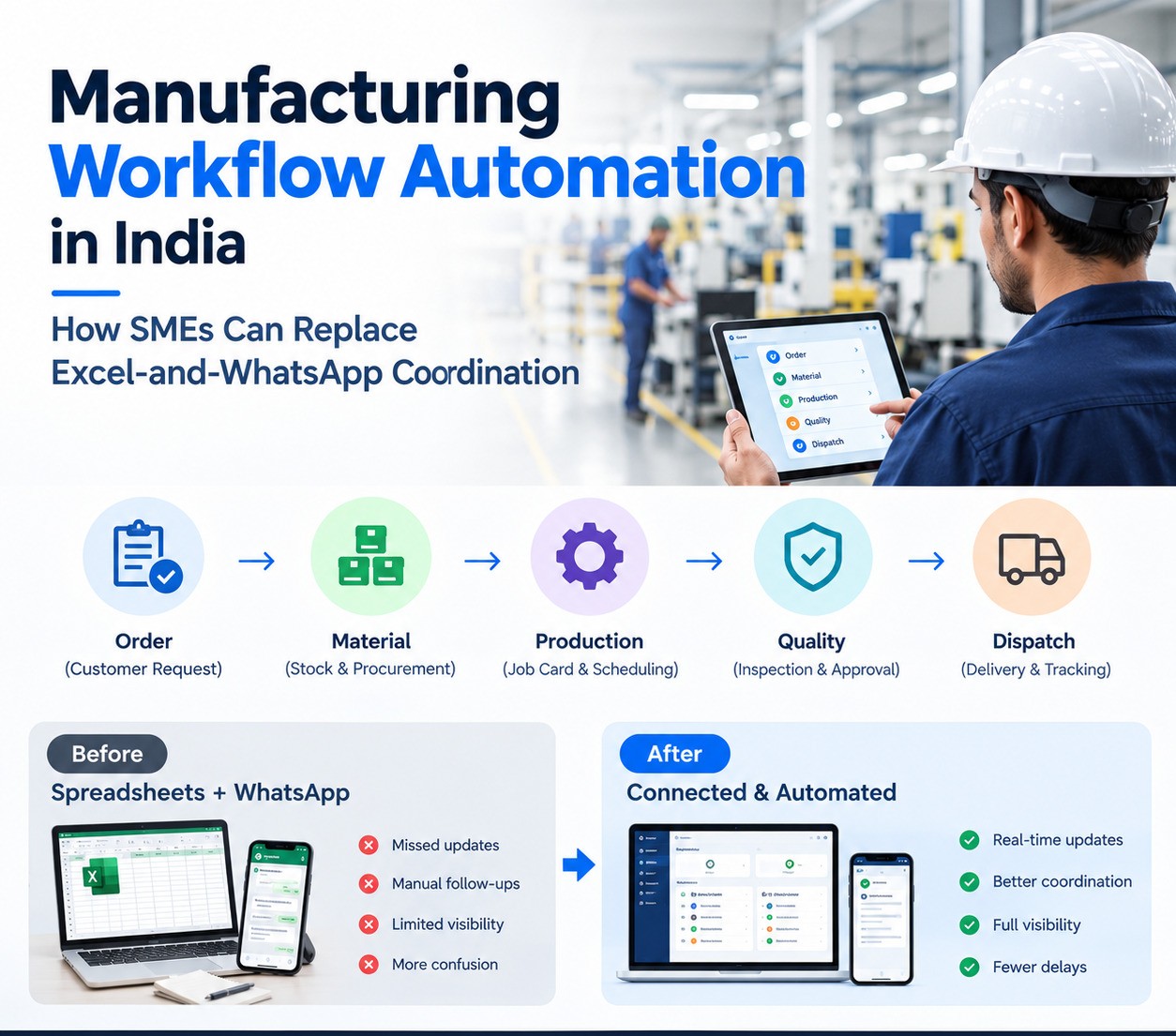
Manufacturing Workflow Automation in India: How SMEs Can Replace Excel-and-WhatsApp Coordination
Many small and mid-sized manufacturers do not have a production problem. They have an information-flow problem.
A customer order arrives in sales. Planning creates an Excel sheet. Stores checks material separately. A supervisor maintains job progress on paper. Quality keeps another register. Dispatch asks production for confirmation. Management receives the real picture through calls and WhatsApp messages.
Every department is working, but the business still lacks one reliable view of what is happening.
Manufacturing workflow automation connects these steps so information moves with the material. When one stage changes, the next team sees it. When a shortage threatens production, it becomes visible early. When quality approves a batch, dispatch no longer waits for a phone call.
For Indian SMEs, this does not always require a giant ERP project on day one. The right approach is often to digitize the highest-friction workflow first and expand from there.
The hidden cost of coordination by spreadsheet and chat
Excel and WhatsApp are useful tools. The problem begins when they become the main system of record for factory operations.
A production plan can be correct at 9 AM and outdated by noon. A storekeeper may issue material physically but update the sheet later. A supervisor may report a machine delay in a group, but the sales team never sees that the customer delivery date is now at risk.
These gaps create secondary work: follow-up calls, duplicate entry, manual reports and emergency decisions.
Automation reduces that coordination burden by creating shared status and clear handoffs.
Start with the order, not the machine
Manufacturing automation should begin with demand.
A confirmed sales order tells the company what must be produced, how much, for whom and by when.
When that information is connected to planning, production work can be linked directly to customer commitments. The planner can see which orders have the earliest delivery dates, which items require long lead-time material and which jobs compete for the same machine.
This is better than running production from an isolated schedule that has no live relationship with sales priorities.
Build a clean item and BOM foundation
Automation depends on master data.
Each item should have a consistent code, description, unit and classification. Manufactured items need an accurate bill of materials. If the BOM is wrong, every downstream calculation will also be wrong.
Before implementing advanced dashboards or AI, SMEs should first clean item masters, units of measure, BOM versions and basic routing information.
This work is not glamorous, but it is what makes material planning and production reporting dependable.
Convert sales demand into work orders
Once demand is approved, the system can create or recommend work orders.
A work order should identify what needs to be produced, quantity, due date, routing or operation sequence and relevant instructions.
The planner can review capacity and material availability before releasing the job.
This creates a controlled transition from commercial demand to shop-floor execution.
Without that step, production often starts based on informal urgency rather than a visible priority system.
Check material availability before production begins
One of the most expensive delays is discovering a shortage after production is already scheduled.
The system should compare required material against available stock before a job is released.
If material is missing, the shortage can create a purchase requirement or appear in a planner’s exception list.
A useful view does not simply show “stock low.” It shows which customer order or work order is affected by that shortage.
That allows purchase teams to prioritize based on delivery risk rather than on whichever request arrives first by phone.
Replace paper job cards with digital execution records
A digital job card does more than remove paper.
It creates a structured record of production activity. The operator or supervisor can see the product, operation, planned quantity and instructions, then record start, completion, produced quantity, rejection and remarks.
The system can update work-in-progress immediately.
A mobile, tablet or shop-floor terminal interface should be designed for speed. Operators should not have to complete a complex office-style form after every action.
The most successful systems capture only the information needed for control and traceability.
Track work-in-progress by operation
Management often knows how many orders were released and how many were completed, but not where the unfinished quantity is currently sitting.
Operation-level WIP tracking solves that.
A dashboard can show quantity waiting for machining, assembly, painting, inspection or packing. Supervisors can see which operation is blocking a delivery.
Sales can also get a more realistic view of order progress instead of being told that an order is “in production.”
This improves customer communication because the status is based on operational data rather than a general update.
Create machine-capacity visibility
Capacity planning does not always need sophisticated scheduling software.
Even a simple system can show planned hours or quantities against available machine capacity for each day or shift.
If several high-priority jobs require the same machine, the planner can see the conflict before it becomes a delay.
As the system matures, actual production time and downtime can improve future planning assumptions.
The key is to begin with a model employees can keep updated reliably.
Record material issue against production
Inventory becomes trustworthy only when movements are recorded at the time they happen.
Material issued to a work order should reduce available stock and be linked to the production job. Excess or unused material should have a defined return process.
This creates traceability between inventory and production consumption.
If physical movement happens today but data entry happens three days later, no dashboard can provide accurate availability.
Process design and shop-floor discipline are therefore as important as software features.
Make quality a workflow gate
Quality inspection should be connected to production, not maintained as an isolated register.
When an operation or batch reaches a defined stage, the system can create an inspection task. The quality team records required parameters, accepted quantity, rejected quantity and remarks.
The workflow then decides what is allowed next.
Approved quantity may move to packing or dispatch. Failed quantity may go to rework, hold or rejection.
This creates a clear audit trail and prevents material from moving forward simply because someone verbally said it was fine.
Track rejection and rework as operational data
Rejection is not only a quality number. It is information that can help improve production.
The system can record defect reason, operation, item, machine, shift or supplier where appropriate.
Over time, management can identify repeat patterns.
Rework should also remain connected to the original production record so quantities do not disappear between departments.
The objective is to understand the cause and cost of poor output, not only to count rejected pieces.
Connect dispatch to production reality
Dispatch teams need confirmed quantity, quality clearance and the required documentation.
A connected workflow can show exactly what is ready to ship. Once dispatch is recorded, the system can update the sales order, inventory and customer status.
The information can also trigger billing or approved customer communication.
This eliminates the common situation where sales promises dispatch based on an outdated production update.
Generate operational documents from the same data
Manufacturing creates many repeated documents: job cards, production slips, material requests, quality reports, packing lists and dispatch documents.
If employees retype order information into each document, errors are inevitable.
A better system generates documents from the same master and transaction data already used in the workflow.
This reduces duplicate entry and ensures the document matches the current system record.
Connect purchase with production shortages
Purchase teams are more effective when they understand why material is required.
Instead of receiving disconnected requests, the system can show the shortage, affected work order, required date and current supplier status.
Purchase requisitions can follow an approval flow before becoming purchase orders.
Expected delivery dates can then feed back into production planning.
This creates a closed loop between demand, material and execution.
Add maintenance as a structured workflow
Machine problems are often reported informally, which means downtime history is unreliable.
A maintenance request should identify the machine, problem, time reported and responsible person. The technician can record action taken, parts used and return-to-service time.
Over time, the plant gains a usable maintenance history.
Preventive-maintenance schedules can then be introduced for assets where downtime has significant impact.
The objective is not to digitize every maintenance detail from day one. It is to stop critical information from disappearing in chat messages.
Build dashboards around decisions
A manufacturing dashboard should answer operational questions, not simply display colorful charts.
Which customer orders are at risk? Which jobs are delayed? What material is blocking production? What quantity is waiting for quality? Which machines have repeated downtime? What is ready for dispatch today?
These are decision-oriented views.
The dashboard becomes useful only when the underlying data is captured as part of normal work. If supervisors still need to prepare a separate report for the dashboard, the system has not truly automated reporting.
Connect customer communication carefully
Customer updates can also be triggered from ERP events.
For example, a dispatch confirmation can pass approved information to a WhatsApp Business API platform. A payment reminder can be created from the accounts status. A service team can receive the customer and order context before making a call.
The business should avoid sending production-stage noise directly to customers. Internal operational detail and customer-facing communication are different things.
Use the system to communicate milestones that actually matter to the customer.
When a focused tool is enough and when ERP is needed
A small manufacturer may begin with a focused production tracker if the main problem is visibility on job progress.
However, separate tools become difficult when sales, purchase, inventory, production, quality, dispatch and billing all need the same underlying data.
That is the point where manufacturing ERP becomes more valuable than adding another spreadsheet or app.
A proper ERP provides common master data, transaction history and connected workflows across departments.
The transition should still be phased. A company can implement the most important modules first and add complexity only when users are ready.
Signals that the business has outgrown Excel-only manufacturing management
One signal is that no one can answer inventory availability confidently without calling stores.
Another is that production status depends on asking supervisors.
A third is repeated data entry between sales, production and billing.
A fourth is that delivery delays are discovered only after the customer follows up.
A fifth is that management reports require several people to prepare them.
When these patterns become normal, software is no longer only an IT project. It becomes an operations-improvement project.
Where AI fits in manufacturing automation
AI can add value after the workflow data is reliable.
It can summarize daily production, classify maintenance notes, extract information from supplier documents or help management query operational data in natural language.
AI can also assist in identifying anomalies when enough historical data exists.
But core transactions such as material issue, quantity completion, quality approval and dispatch should remain governed by controlled business rules.
A factory does not need an AI layer to fix inconsistent item codes or unrecorded stock movements.
Foundational data comes first.
A phased implementation roadmap for SMEs
The safest implementation begins with process mapping.
Follow one real order from customer confirmation to dispatch. Write down every handoff, spreadsheet, register, approval and duplicate entry.
Choose the area with the highest coordination cost.
Build a pilot around one product family, line or department. Keep the forms simple. Train users on the reason behind each status.
Run the pilot long enough to expose exceptions.
Once the data is reliable, connect additional modules such as purchase, quality, dispatch and customer communication.
This staged approach reduces resistance and gives the business measurable improvement at every step.
Common implementation mistakes
The first mistake is copying the paper process exactly into software without questioning whether every step is still necessary.
The second is asking operators to enter too much data.
The third is ignoring master-data cleanup.
The fourth is rolling out every module at once without a stable pilot.
The fifth is designing the system only with management and not with the people who actually run the process.
The sixth is treating ERP as a one-time installation. Manufacturing systems need ongoing ownership, improvement and training.
How InfoTechBrains supports manufacturing digitization
InfoTechBrains provides manufacturing ERP, custom software and workflow automation for businesses that want production, inventory, quality, dispatch and reporting to operate from connected data.
The solution may involve ERPNext implementation, customization, custom dashboards, Google Sheets migration, APIs, WhatsApp integration or purpose-built software where standard ERP does not fit.
The starting point is understanding how the plant currently works and where information gets delayed or duplicated.
Technology is then selected around the process rather than forcing the process to fit a generic screen.
Frequently asked questions
How does manufacturing workflow automation work?
It is the use of connected software workflows to move information between sales orders, planning, inventory, production, quality, dispatch and other factory functions automatically or with structured user actions.
Can a small manufacturer start without full ERP?
Yes. A focused production or inventory workflow can be a good first step. ERP becomes more useful when several departments need one shared source of operational data.
Can digital job cards replace paper job cards?
Yes. A digital system can show planned work and capture actual quantity, timing, rejection and remarks while updating WIP automatically.
Can ERP send WhatsApp updates?
ERP events can be connected with an official WhatsApp Business API platform for approved customer or internal communication where appropriate.
Is AI required for smart manufacturing?
No. Reliable master data, real-time status and connected workflows usually create more immediate value. AI should be added where it solves a specific interpretation or prediction problem.
Conclusion
Manufacturing workflow automation is fundamentally about visibility and coordination.
When the order, material, job card, quality decision and dispatch status exist in one connected process, teams spend less time asking for updates and more time solving actual production problems.
For SMEs that have grown beyond spreadsheet-and-WhatsApp coordination, the right next step is not necessarily a massive transformation program. It is a focused pilot that proves one workflow can run better with shared, real-time data.
From there, InfoTechBrains can help expand the system into a manufacturing ERP or custom platform that fits the company’s real operations.
About the author
InfoTechBrains Team
Technology expert focused on software architecture, automation, and digital transformation.
View profile & all posts →