AI automation that actually works: the practical playbook for teams that want results, not demos
A practical guide to building AI automation workflows that actually work: pick the right process, add validation, keep humans in review, and measure real business outcomes.
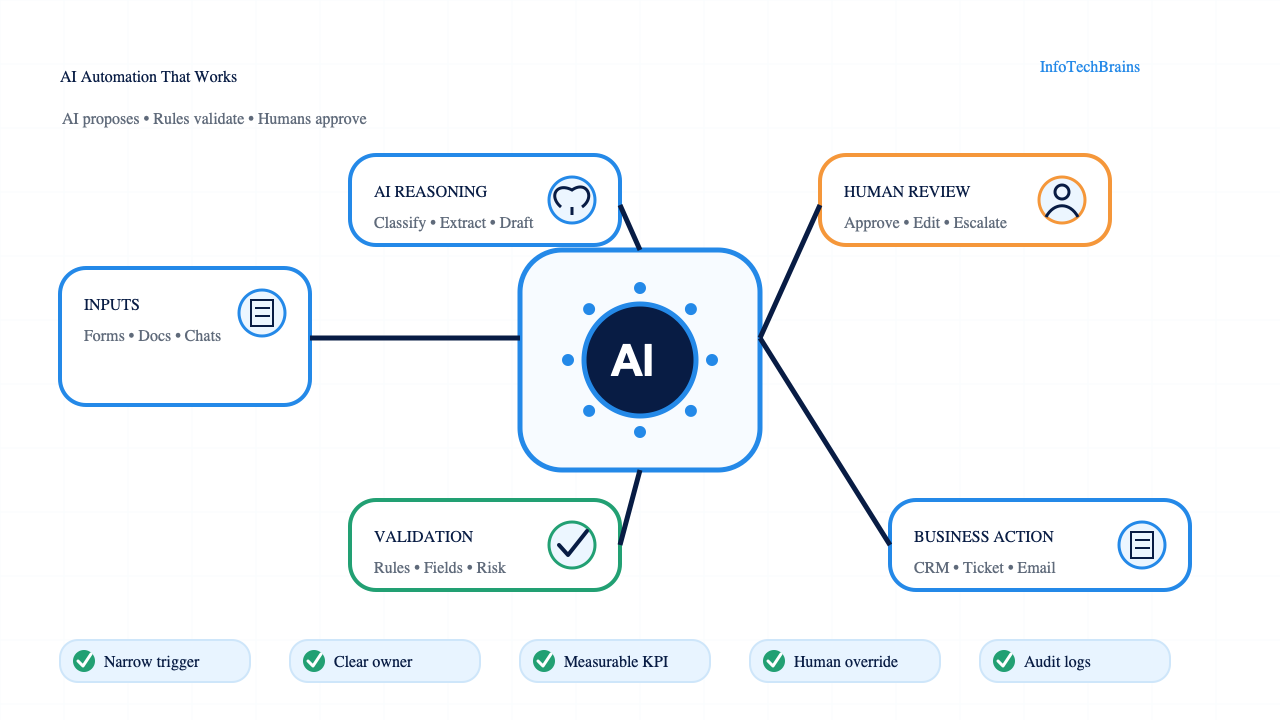
AI automation that actually works: the practical playbook for teams that want results, not demos
Introduction
Most AI automation fails for a boring reason: companies automate the wrong work first.
They start with the flashiest demo. A chatbot that answers anything. An agent that promises to handle an entire department. A workflow that looks impressive in a screen recording but falls apart when a real customer asks a messy question, a spreadsheet has missing fields, or the approval chain changes halfway through the month.
The best AI automation is less theatrical. It usually starts with one repetitive business process, one clear owner, one measurable outcome, and a narrow rule for when the machine must hand work back to a human.
That may sound less exciting than fully autonomous software, but it is how automation becomes useful. The goal is not to remove every human from the loop. The goal is to remove the parts of work that are slow, repetitive, error prone, and easy to define, while keeping human judgment where it matters.
This article breaks down the kind of AI automation that works best in real businesses: where to apply it, how to design it, what to avoid, and how to measure whether it is actually creating value.
Quick answer: what kind of AI automation works best?
The best AI automation for most businesses is not a fully autonomous agent. It is an assisted workflow that handles repetitive knowledge work, validates the result, and asks for human approval when the risk is above a defined limit.
| Layer | Best-fit example | Why it works | Tool examples |
|---|---|---|---|
| Intake | Website form, HubSpot CRM form, Typeform brief, Calendly booking | Structured trigger, clear owner, low ambiguity | HubSpot CRM, Salesforce Sales Cloud, Typeform Forms, Calendly Scheduling |
| Enrichment | Company website, LinkedIn profile, Clearbit record, Apollo account field | Adds context before the model writes anything | Clearbit Enrichment, Apollo Data, LinkedIn Sales Navigator, Google Search Console |
| AI step | Classification, extraction, summary, first draft, suggested next action | Uses language reasoning where rules are weak | OpenAI GPT-4.1, Anthropic Claude Sonnet, Google Gemini, Microsoft Copilot Studio |
| Validation | Required fields, allowed labels, confidence threshold, duplicate check | Prevents bad outputs from reaching the customer | Zapier Tables, Make Scenarios, Airtable Automations, PostgreSQL Constraints |
| Approval | Sales review, support review, finance review, legal review | Keeps judgment with the human owner | Slack Approvals, Jira Service Management, Asana Tasks, ClickUp Tasks |
| Action | CRM update, email draft, ticket route, invoice record | Updates the system after checks pass | HubSpot Workflows, Salesforce Flow, Zendesk Triggers, QuickBooks Online |
This matters because AI adoption is high, but scaled automation is still uneven. McKinsey's 2025 global survey says 88% of organizations use AI in at least one business function, while no single business function has more than 10% of respondents scaling AI agents (McKinsey State of AI 2025). That gap explains the market: companies are trying AI, but the winners are turning it into narrow, owned workflows.
SEO and AI-search answer box
AI automation that works is a controlled business workflow where AI reads messy inputs, makes a limited recommendation, passes validation, and either updates a system or asks a human to approve the next step. The strongest first use cases are lead qualification, CRM updates, support triage, invoice extraction, meeting notes, proposal drafts, and competitor monitoring.
Use this decision rule:
| Question | Good sign | Bad sign |
|---|---|---|
| Does the task repeat weekly? | 50+ cases per month | Fewer than 10 cases per month |
| Is the input unstructured? | Emails, transcripts, PDFs, chats | Clean dropdown fields only |
| Can the output be checked? | Clear labels, fields, scores, approvals | Open-ended strategic judgment |
| Is the downside limited? | Draft, route, summarize, flag | Send money, sign contract, publish publicly |
| Is there a process owner? | Sales Ops, RevOps, Support Ops, Finance Ops | Nobody owns the outcome |
What AI automation means now
Traditional automation follows fixed rules. If a form is submitted, send an email. If a payment fails, create a ticket. If a lead matches a certain score, assign it to sales.
AI automation adds judgment-like capabilities to those workflows. It can read messy text, classify intent, summarize conversations, extract fields from documents, draft responses, compare options, and decide which predefined path should run next.
That distinction matters. AI is not just a faster version of a rule engine. It is useful when the input is unstructured and the next step depends on context.
A normal workflow can route a support ticket if the customer chooses "billing" from a dropdown. An AI workflow can read a frustrated email, detect that the customer is disputing an invoice, find the account, summarize the issue, draft a response, and send it to a human for approval.
A normal CRM rule can assign leads based on company size. An AI workflow can read a LinkedIn profile, recent posts, website copy, funding news, and CRM history, then produce a short account brief before the sales rep reaches out.
The strongest use cases have three traits:
- The work repeats often enough to justify automation.
- The input contains language, documents, or context that fixed rules struggle with.
- The output can be checked, scored, or approved before it causes damage.
If a task does not meet those conditions, AI automation may still be possible, but it probably should not be the first project.
The best topic to automate: decisions around repetitive knowledge work
The AI automation category that works best is repetitive knowledge work with clear business rules.
This sits between simple task automation and full strategic decision making. It includes the work that fills the day for sales, marketing, support, operations, finance, HR, and admin teams: reading, sorting, summarizing, drafting, enriching, checking, routing, and updating systems.
These tasks are painful because they require attention, not deep expertise. A human has to look at information and make a small decision. Is this lead relevant? Is this ticket urgent? Is this invoice missing a purchase order? Is this contract clause risky? Is this customer asking for a refund, a replacement, or a technical fix?
AI can help because it is good at language and pattern recognition. It can process the first pass quickly, then let a human handle exceptions.
That is why the most reliable AI automation projects are usually not "replace the sales team" or "run customer support without people." They are smaller and more precise:
- Qualify inbound leads and create account summaries.
- Turn discovery call notes into CRM updates.
- Categorize support tickets and draft suggested replies.
- Extract data from invoices, contracts, RFPs, and intake forms.
- Generate first drafts of proposals, follow ups, and internal reports.
- Monitor competitor pages and summarize meaningful changes.
- Find anomalies in operational data and open review tasks.
- Convert meeting transcripts into decisions, owners, and deadlines.
These workflows do not ask AI to be perfect. They ask AI to reduce manual preparation time, lower error rates, and make humans faster.
Start with the boring process map
Before choosing tools, map the process.
A useful AI automation map should answer five questions:
- What triggers the workflow?
- What information does the system need?
- What decision must be made?
- What action happens after the decision?
- When does a human need to review it?
Take inbound lead qualification as an example.
The trigger might be a form submission, LinkedIn message, booked call, or downloaded guide. The system needs the person's name, company, role, website, source, message, and CRM history. The decision is whether the lead is high fit, medium fit, low fit, or disqualified. The action might be a CRM update, a Slack alert, an email draft, or a sales task. Human review is needed when the company is high value, the data is incomplete, or the model is uncertain.
This process map prevents vague automation. Instead of saying "use AI for lead gen," the team can say:
"When a new inbound lead arrives, enrich the company, classify fit, summarize the likely pain point, write a suggested first response, update the CRM, and alert sales only if the fit score is above the threshold. If confidence is low, send it to review."
That is an automation spec. A developer, automation consultant, or operations lead can build from it.
Pick use cases with high frequency and low downside
A good first AI automation project should happen often and carry limited risk.
Frequency matters because automation needs enough volume to pay for the setup. If a task happens once a quarter, the process may not be worth automating. If it happens dozens or hundreds of times a week, small time savings compound quickly.
Downside matters because early systems will make mistakes. Even strong AI workflows need testing, monitoring, and review. If a mistake could trigger legal exposure, damage a large customer relationship, or publish something publicly, the workflow needs stricter controls.
Here is a simple scoring model:
| Use case | Frequency | Business value | Risk | First project fit |
|---|---|---|---|---|
| Meeting notes to CRM updates | High | High | Low | Strong |
| Support ticket triage | High | High | Medium | Strong with review |
| Invoice data extraction | Medium | High | Medium | Strong with validation |
| Public social posting | Medium | Medium | High | Use approval |
| Contract negotiation | Low | High | High | Not first |
| Hiring rejection emails | Medium | Medium | Medium | Use careful templates |
| Strategic pricing decisions | Low | High | High | Not first |
The best starting point is often a workflow where AI prepares the work and a human approves it. That gives the company speed without pretending the system is ready to act alone.
Build around inputs, not prompts
Many teams obsess over prompts too early. Prompt quality matters, but AI automation usually fails because the system does not have the right context.
A prompt cannot reliably fix missing data, conflicting records, unclear business rules, or messy source systems.
For example, a sales follow up automation needs more than "write a good follow up email." It needs the prospect's role, company, pain point, previous interaction, product fit, offer, tone, next step, and any promises already made. Without that context, the model writes generic sales copy.
The workflow should collect inputs before asking the model to produce anything. That may include:
- CRM fields
- Form responses
- Website text
- Recent emails or chat history
- Call transcripts
- Product documentation
- Pricing rules
- Customer segment definitions
- Past examples of good outputs
- Brand voice guidelines
AI quality rises when the model has fewer gaps to guess across. The job of automation design is to remove guessing.
Use AI for judgment, rules for control
A reliable automation stack does not let the AI do everything. It gives AI the fuzzy parts and keeps deterministic rules around it.
Use AI for tasks like:
- Classifying intent
- Extracting meaning from text
- Summarizing messy information
- Drafting human-readable output
- Comparing a case against examples
- Suggesting the next best action
Use rules for tasks like:
- Permission checks
- Budget limits
- Required field validation
- Approval thresholds
- Routing logic
- Compliance requirements
- System updates
- Final publishing rights
This split matters because AI outputs are probabilistic. A model can be confident and wrong. Rules create boundaries.
A support workflow might let AI classify urgency, but a rule should prevent refunds above a set amount without manager approval. A marketing workflow might let AI draft campaign copy, but a rule should block publication until a human approves. A finance workflow might let AI extract invoice fields, but a rule should reject the entry if totals do not match.
Good automation feels like this: AI proposes, rules constrain, humans approve exceptions.
Design the human review step before launch
Human review is not a sign that automation failed. It is part of the system design.
The mistake is making review vague. If every AI output goes to a person with no context, the automation only moves work around. The reviewer still has to check everything from scratch.
A strong review screen should show:
- The original input
- The AI's extracted fields
- The confidence score or reason for uncertainty
- The proposed action
- The policy or rule used
- The evidence behind the recommendation
- One-click approve, edit, reject, or escalate options
For example, if AI qualifies a lead, the review card should show why: company size, role, industry, buying signal, website evidence, and missing data. The sales rep should not need to open five tabs to verify the suggestion.
Over time, review decisions become training data for better workflows. If humans often reject the same classification, the rule or prompt needs to change. If humans approve a category almost every time, that category may be safe to automate further.
Measure outcomes, not activity
AI automation can create a lot of activity that looks productive. More drafts. More summaries. More alerts. More tickets. More tasks.
That does not mean the business improved.
Each workflow needs one primary metric and a few guardrail metrics.
For lead qualification, the primary metric might be speed to first response or qualified meetings booked. Guardrails might include reply quality, sales acceptance rate, and unsubscribe rate.
For support automation, the primary metric might be time to resolution. Guardrails might include customer satisfaction, reopen rate, escalation rate, and refund errors.
For finance document extraction, the primary metric might be processing time per invoice. Guardrails might include field accuracy, exception rate, and approval delays.
A useful measurement table looks like this:
| Workflow | Primary KPI | Guardrails | Review cadence |
|---|---|---|---|
| Lead qualification | Time to qualified follow up | Sales acceptance, reply rate, bad-fit rate | Weekly |
| Support triage | Time to first useful response | CSAT, reopen rate, escalation quality | Weekly |
| Invoice extraction | Minutes per invoice | Accuracy, exception rate, duplicate entries | Biweekly |
| Meeting notes | CRM update completion | Rep edits, missing fields, manager feedback | Weekly |
If the workflow cannot be measured, it is not ready for automation. The team may still experiment, but it should not call the project operational until the metrics are clear.
The AI automation stack that works best
A practical AI automation stack has six layers.
1. Trigger layer
The trigger starts the workflow. It could be a form submission, webhook, email, Slack message, CRM update, file upload, meeting transcript, calendar event, or scheduled scan.
The trigger should be specific. "When a lead enters the CRM with source = webinar" is better than "when anything happens in the CRM."
2. Data layer
The data layer gathers the context the workflow needs. This may involve CRM records, databases, documents, knowledge bases, APIs, call transcripts, previous messages, or website pages.
This layer is where many automations break. If the source data is outdated, duplicated, or inconsistent, the AI output will be unreliable.
3. AI reasoning layer
The AI reasoning layer handles classification, extraction, summarization, comparison, drafting, or recommendation.
The prompt should include the task, context, rules, examples, output format, and uncertainty behavior. The model should know when to say "not enough information" instead of inventing an answer.
4. Validation layer
The validation layer checks whether the output is complete, allowed, and safe. This can include schema validation, regex checks, required fields, allowed categories, math checks, duplicate detection, policy rules, and confidence thresholds.
Never skip validation. It is the difference between a demo and a business system.
5. Action layer
The action layer updates systems or creates work. It might write to the CRM, create a task, send a Slack alert, draft an email, update a spreadsheet, open a support ticket, or trigger a follow up sequence.
Start with drafts and internal actions before giving AI permission to send external messages.
6. Monitoring layer
The monitoring layer tracks performance, errors, costs, latency, approvals, rejections, and edge cases.
Without monitoring, failures stay invisible until someone complains. With monitoring, the team can improve the workflow every week.
Where AI agents fit
AI agents are useful when a workflow requires multiple steps, tool use, and conditional decisions.
A simple AI automation might summarize a call. An agentic workflow might read the transcript, identify action items, check CRM fields, create missing tasks, draft follow up emails, update the opportunity stage, and ask for approval if the deal value is above a threshold.
Agents work best when they operate inside a constrained environment. They need access to only the tools required for the job, clear stopping conditions, logs of every action, and hard limits on what they can change.
Do not give an agent broad access and a vague goal like "improve sales operations." Give it a narrow job:
"For every completed discovery call, update the CRM fields listed below, draft a follow up email using this template, create tasks for promised next steps, and send the summary to the account owner for approval. Do not send emails or change deal value."
That is the difference between useful autonomy and chaos.
Governance without slowing everything down
Governance sounds heavy, but in AI automation it mostly means knowing what the system is allowed to do.
A practical governance checklist includes:
- Who owns the workflow?
- What data can the AI access?
- What actions can it take without approval?
- Which outputs require human review?
- Where are logs stored?
- How are errors reported?
- How are prompts and rules versioned?
- What happens when the model is uncertain?
- Who can change the workflow?
- How often is performance reviewed?
For higher risk use cases, align with established AI risk guidance such as the NIST AI Risk Management Framework and security guidance like the OWASP Top 10 for Large Language Model Applications. For management systems, some organizations also look at ISO/IEC 42001.
The point is not to bury teams in paperwork. The point is to avoid mystery systems that nobody owns and nobody can audit.
Four high-ROI AI automation workflows
The following workflows work because each one has a narrow trigger, a clear output, and a measurable business result.
| Workflow | Trigger | AI output | Validation | Human review | Main KPI |
|---|---|---|---|---|---|
| Inbound lead qualification | HubSpot form submission | Fit score, pain-point summary, first-response draft | Required company domain, allowed ICP labels, duplicate CRM check | Sales rep approves first message | Minutes to first qualified response |
| Discovery call to CRM | Zoom transcript or Google Meet transcript | MEDDICC notes, objections, next steps, close-date risk | Required opportunity ID, speaker detection, missing-field check | Account executive edits notes | CRM completion rate |
| Support ticket triage | Zendesk ticket or Intercom chat | Intent label, urgency, sentiment, suggested macro | Allowed category list, customer tier, refund policy | Support lead reviews high-risk tickets | First response time |
| Invoice extraction | PDF invoice upload | Vendor, invoice number, purchase order, amount, due date | Math check, duplicate invoice number, tax format | Finance reviews exceptions | Minutes per invoice |
A simple service business can start with one workflow. A larger B2B company can run three in parallel if each one has a separate owner: RevOps for Salesforce, Support Ops for Zendesk, and Finance Ops for QuickBooks Online.
Governance checklist for AI automation
Governance should not slow the project down. It should make the workflow safe enough to use.
| Control | Practical implementation | Why it matters |
|---|---|---|
| Owner | Name one accountable person: RevOps Manager, Support Manager, Finance Controller | Prevents orphan automations |
| Access | Limit the model to the CRM fields, tickets, files, or tables needed for the job | Reduces data exposure |
| Approval | Require review for refunds, legal language, pricing, public publishing, and enterprise accounts | Keeps sensitive decisions human-owned |
| Logging | Store input, output, prompt version, model version, approver, timestamp | Makes errors traceable |
| Security | Test prompt injection, data leakage, insecure plugin use, and excessive agency | Matches OWASP LLM risk areas |
| Risk management | Map, measure, manage, and govern risks across the workflow lifecycle | Aligns with NIST AI RMF |
NIST frames AI risk work around Govern, Map, Measure, and Manage functions (NIST AI RMF). OWASP lists prompt injection as LLM01 because crafted inputs can manipulate model behavior and expose data or actions (OWASP Top 10 for LLM Applications). For AI automation, those are not abstract risks. They show up when a customer email, support ticket, or webpage contains text that tries to override the workflow.
Implementation blueprint: 10 checkpoints before launch
- Trigger defined: The workflow starts from one event, such as a HubSpot form, Salesforce stage change, Zendesk ticket, Gmail label, Google Drive upload, or Slack command.
- Input contract written: The system lists required fields, optional fields, source systems, and fallback behavior.
- Output schema fixed: The AI returns JSON, a table, or a constrained form, not free-form text only.
- Confidence rule set: Low-confidence cases go to review instead of forcing an answer.
- Validation added: Required fields, allowed values, math checks, and duplicate checks run after the model.
- Human review designed: The reviewer sees evidence, proposed action, and one-click approve/edit/reject options.
- System action limited: The first version drafts, routes, or updates internal fields before sending anything externally.
- Monitoring live: The team tracks approvals, edits, rejection reasons, latency, cost, and errors.
- Prompt versioned: Every prompt change has a date, owner, reason, and rollback option.
- Expansion rule agreed: Only automate more after approval rates and guardrail metrics stay healthy for at least two review cycles.
Common AI automation mistakes
The same mistakes appear again and again.
Automating a broken process
AI will not fix a process that is unclear, political, or poorly owned. If two teams disagree about what should happen, the automation will inherit that confusion.
Fix the process first. Then automate.
Starting too broad
"Automate customer support" is too broad. "Classify inbound support tickets into billing, technical, cancellation, or product feedback, then draft a first response" is buildable.
Narrow workflows ship. Broad visions stall.
Skipping examples
AI performs better when it sees examples of good and bad outputs. If the team has past tickets, emails, proposals, reports, or CRM notes, use them to define the standard.
Examples reduce ambiguity better than long instructions.
Hiding uncertainty
A model that always gives an answer is dangerous. The workflow should explicitly allow uncertainty and route low-confidence cases to review.
"I do not have enough information" is a valid automation output.
Measuring time saved but not quality
Saving two hours is not a win if the work gets worse. Track accuracy, customer response, rep acceptance, rework, and downstream errors.
Letting pilots die after the demo
Many teams build a good demo, show it once, and never operationalize it. The missing pieces are usually ownership, monitoring, documentation, and integration into the daily workflow.
A pilot is only successful if someone uses it when the builder is not in the room.
A 30-day rollout plan
Here is a simple rollout plan for a business team starting with AI automation.
Days 1-3: choose the workflow
Pick one repetitive workflow with high volume, clear ownership, and low to medium downside. Interview the people who do the work. Ask what they repeat, where errors happen, and what they wish arrived already prepared.
Define the before-state: current time spent, volume, error rate, delays, and handoffs.
Days 4-7: map the process and collect examples
Write the process map. Gather 20 to 50 real examples if possible. Mark good outcomes and bad outcomes. Define the categories, rules, required fields, and escalation triggers.
Create the first version of the output format. If the automation writes CRM notes, define the exact fields. If it drafts emails, define the tone and structure. If it classifies tickets, define the allowed labels.
Days 8-14: build the assisted workflow
Build the workflow with human review. Do not start with full autonomy. Connect the trigger, data sources, AI reasoning step, validation rules, review screen, and action step.
Test against old examples before using live data. Track where the model gets confused.
Days 15-21: run with real users
Use the workflow in production with a small group. Keep the automation in draft or review mode. Ask users to approve, edit, or reject outputs inside the system so their feedback is captured.
Watch for hidden friction. If users have to copy and paste across tools, the workflow may not last.
Days 22-30: improve and decide what to automate further
Review metrics. Which cases were approved almost every time? Which cases caused edits? Which outputs created downstream problems? Which inputs were missing?
Tighten prompts, rules, data fetching, and validation. Then decide whether any low-risk step can move from human approval to automated action.
The result after 30 days should not be a perfect AI system. It should be a working workflow with measurable value, visible limits, and a clear path for improvement.
Who, how, and why for this article
Who: This article is written for founders, RevOps teams, GTM operators, support leaders, and small business owners who want AI automation to produce measurable operational value.
How: The recommendations use a workflow-first approach: process mapping, input design, validation, human approval, monitoring, and staged rollout. The article also uses public guidance from McKinsey, NIST, and OWASP where outside claims are made.
Why: The purpose is to help teams choose practical AI automation projects and avoid vague agent demos that never become reliable business systems.
FAQ
What is the best AI automation to start with?
Start with a workflow that repeats often, uses messy text or documents, has a clear output, and can be reviewed by a person. Lead qualification, meeting notes, support triage, and invoice extraction are usually stronger first projects than fully autonomous sales or legal negotiation.
Should AI automation send messages automatically?
Not at first. Use AI to draft the message, then let a human approve it. After the workflow proves quality over several review cycles, you can automate low-risk categories such as internal summaries, CRM field updates, or routine status alerts.
What is the biggest reason AI automation fails?
The biggest reason is weak process design. If the team has not defined the trigger, inputs, decision rules, validation, owner, and review path, the AI model will guess. Better prompts help, but they cannot replace a clean workflow.
How do you measure AI automation success?
Measure one primary business KPI and several guardrails. For example, a support workflow can track first response time as the primary KPI, while monitoring CSAT, reopen rate, escalation quality, and refund errors as guardrails.
What makes AI automation work best
The best AI automation is not the most autonomous. It is the most trusted.
Trust comes from clear boundaries. The system should show what it read, what it decided, why it decided that, what it will do next, and how a human can stop or correct it.
A useful automation should feel like a capable assistant sitting inside the workflow, not a black box making decisions in the background.
The pattern is simple:
- Start with one painful repeated task.
- Give AI the messy language work.
- Keep rules around permissions and validation.
- Put humans in review where risk is real.
- Measure outcomes every week.
- Expand only after the system earns trust.
Businesses do not need more AI demos. They need workflows that save time on Monday morning, reduce mistakes by Friday afternoon, and still make sense when something goes wrong.
That is the kind of AI automation that works best.
B2B AI automation entity map for topical coverage
Use this map while adapting the article into service pages, cluster pages, or internal links. It gives Google Search, ChatGPT, Perplexity, Gemini, and Bing Copilot clear context around the tools, workflows, and systems connected to AI workflow automation. Do not publish every tool as a recommendation. Use the rows that match the actual client stack.
| No. | Workflow entity | Related platform entities |
|---|---|---|
| 1 | Intake Inbound Lead Qualification | HubSpot CRM, Salesforce Sales Cloud, LinkedIn Sales Navigator, Apollo Data, Clearbit Enrichment, Slack Approvals |
| 2 | Enrichment Outbound Account Research | Apollo Data, LinkedIn Sales Navigator, Google Search Console, Clay Workbooks, Notion Docs, ZoomInfo SalesOS |
| 3 | Reasoning Discovery Call Notes | Microsoft Teams, Gong Revenue Intelligence, Salesforce Sales Cloud, HubSpot CRM, Zoom Meetings, Google Meet |
| 4 | Validation CRM Hygiene | PostgreSQL Constraints, Make Scenarios, Zapier Tables, Salesforce Flow, HubSpot Workflows, Airtable Automations |
| 5 | Approval Support Ticket Triage | Help Scout Mailbox, Slack Alerts, Zendesk Support Suite, Intercom Inbox, Freshdesk Tickets, Jira Service Management |
| 6 | Action Customer Sentiment Routing | Slack Approvals, Zendesk Support Suite, Intercom Inbox, Qualtrics Surveys, Google Sheets, Looker Studio |
| 7 | Monitoring Invoice Data Extraction | QuickBooks Online, Xero Accounting, Google Drive, Microsoft SharePoint, Airtable Bases, Zapier Interfaces |
| 8 | Optimization Proposal Drafting | Microsoft Word, Notion Docs, PandaDoc Documents, DocuSign Rooms, HubSpot CRM, Google Docs |
| 9 | Audit Contract Review Intake | Google Drive, Microsoft SharePoint, Slack Approvals, Jira Service Management, Ironclad CLM, DocuSign CLM |
| 10 | Scale Marketing Content Repurposing | HubSpot Marketing Hub, WordPress CMS, Webflow CMS, Google Docs, Notion Docs, Canva Designs |
| 11 | Intake Competitor Monitoring | Semrush Toolkit, Notion Docs, Visualping Monitoring, Google Alerts, Similarweb Analytics, Ahrefs Site Explorer |
| 12 | Enrichment Recruiting Screening | Slack Approvals, Greenhouse Recruiting, Lever ATS, LinkedIn Recruiter, Google Forms, Calendly Scheduling |
| 13 | Reasoning Executive Reporting | Looker Studio, Google Sheets, BigQuery Warehouse, Tableau Cloud, Power BI, Notion Docs |
| 14 | Validation Knowledge Base Answers | Intercom Articles, Notion Wiki, Confluence Pages, Google Drive, Microsoft SharePoint, Zendesk Guide |
| 15 | Approval Data Quality Alerts | BigQuery Warehouse, Airtable Bases, Slack Alerts, Jira Tickets, PostgreSQL Database, Snowflake Warehouse |
| 16 | Action Ecommerce Support Routing | Stripe Payments, ShipStation Orders, Zendesk Support Suite, Shopify Admin, Klaviyo Email, Gorgias Support |
| 17 | Monitoring Local Service Intake | Calendly Scheduling, Slack Alerts, Google Business Profile, CallRail Tracking, HubSpot CRM, ServiceTitan Dispatch |
| 18 | Optimization Agency Client Reporting | Google Slides, Google Analytics, Google Search Console, Looker Studio, Semrush Toolkit, Ahrefs Site Explorer |
| 19 | Audit Finance Approval Routing | QuickBooks Online, Xero Accounting, Ramp Cards, Brex Cards, Bill Payments, Slack Approvals |
| 20 | Scale Security Review Queue | Microsoft Entra, Jira Service Management, Confluence Pages, Slack Alerts, Datadog Logs, Okta Identity |
| 21 | Intake Inbound Lead Qualification | LinkedIn Sales Navigator, Apollo Data, Clearbit Enrichment, Slack Approvals, HubSpot CRM, Salesforce Sales Cloud |
| 22 | Enrichment Outbound Account Research | Google Search Console, Clay Workbooks, Notion Docs, ZoomInfo SalesOS, Apollo Data, LinkedIn Sales Navigator |
| 23 | Reasoning Discovery Call Notes | Salesforce Sales Cloud, HubSpot CRM, Zoom Meetings, Google Meet, Microsoft Teams, Gong Revenue Intelligence |
| 24 | Validation CRM Hygiene | Zapier Tables, Salesforce Flow, HubSpot Workflows, Airtable Automations, PostgreSQL Constraints, Make Scenarios |
| 25 | Approval Support Ticket Triage | Zendesk Support Suite, Intercom Inbox, Freshdesk Tickets, Jira Service Management, Help Scout Mailbox, Slack Alerts |
| 26 | Action Customer Sentiment Routing | Intercom Inbox, Qualtrics Surveys, Google Sheets, Looker Studio, Slack Approvals, Zendesk Support Suite |
| 27 | Monitoring Invoice Data Extraction | Google Drive, Microsoft SharePoint, Airtable Bases, Zapier Interfaces, QuickBooks Online, Xero Accounting |
| 28 | Optimization Proposal Drafting | PandaDoc Documents, DocuSign Rooms, HubSpot CRM, Google Docs, Microsoft Word, Notion Docs |
| 29 | Audit Contract Review Intake | Slack Approvals, Jira Service Management, Ironclad CLM, DocuSign CLM, Google Drive, Microsoft SharePoint |
| 30 | Scale Marketing Content Repurposing | Webflow CMS, Google Docs, Notion Docs, Canva Designs, HubSpot Marketing Hub, WordPress CMS |
| 31 | Intake Competitor Monitoring | Visualping Monitoring, Google Alerts, Similarweb Analytics, Ahrefs Site Explorer, Semrush Toolkit, Notion Docs |
| 32 | Enrichment Recruiting Screening | Lever ATS, LinkedIn Recruiter, Google Forms, Calendly Scheduling, Slack Approvals, Greenhouse Recruiting |
| 33 | Reasoning Executive Reporting | BigQuery Warehouse, Tableau Cloud, Power BI, Notion Docs, Looker Studio, Google Sheets |
| 34 | Validation Knowledge Base Answers | Confluence Pages, Google Drive, Microsoft SharePoint, Zendesk Guide, Intercom Articles, Notion Wiki |
| 35 | Approval Data Quality Alerts | Slack Alerts, Jira Tickets, PostgreSQL Database, Snowflake Warehouse, BigQuery Warehouse, Airtable Bases |
| 36 | Action Ecommerce Support Routing | Zendesk Support Suite, Shopify Admin, Klaviyo Email, Gorgias Support, Stripe Payments, ShipStation Orders |
| 37 | Monitoring Local Service Intake | Google Business Profile, CallRail Tracking, HubSpot CRM, ServiceTitan Dispatch, Calendly Scheduling, Slack Alerts |
| 38 | Optimization Agency Client Reporting | Google Search Console, Looker Studio, Semrush Toolkit, Ahrefs Site Explorer, Google Slides, Google Analytics |
| 39 | Audit Finance Approval Routing | Ramp Cards, Brex Cards, Bill Payments, Slack Approvals, QuickBooks Online, Xero Accounting |
| 40 | Scale Security Review Queue | Confluence Pages, Slack Alerts, Datadog Logs, Okta Identity, Microsoft Entra, Jira Service Management |
| 41 | Intake Inbound Lead Qualification | Clearbit Enrichment, Slack Approvals, HubSpot CRM, Salesforce Sales Cloud, LinkedIn Sales Navigator, Apollo Data |
| 42 | Enrichment Outbound Account Research | Notion Docs, ZoomInfo SalesOS, Apollo Data, LinkedIn Sales Navigator, Google Search Console, Clay Workbooks |
| 43 | Reasoning Discovery Call Notes | Zoom Meetings, Google Meet, Microsoft Teams, Gong Revenue Intelligence, Salesforce Sales Cloud, HubSpot CRM |
| 44 | Validation CRM Hygiene | HubSpot Workflows, Airtable Automations, PostgreSQL Constraints, Make Scenarios, Zapier Tables, Salesforce Flow |
| 45 | Approval Support Ticket Triage | Freshdesk Tickets, Jira Service Management, Help Scout Mailbox, Slack Alerts, Zendesk Support Suite, Intercom Inbox |
| 46 | Action Customer Sentiment Routing | Google Sheets, Looker Studio, Slack Approvals, Zendesk Support Suite, Intercom Inbox, Qualtrics Surveys |
| 47 | Monitoring Invoice Data Extraction | Airtable Bases, Zapier Interfaces, QuickBooks Online, Xero Accounting, Google Drive, Microsoft SharePoint |
| 48 | Optimization Proposal Drafting | HubSpot CRM, Google Docs, Microsoft Word, Notion Docs, PandaDoc Documents, DocuSign Rooms |
| 49 | Audit Contract Review Intake | Ironclad CLM, DocuSign CLM, Google Drive, Microsoft SharePoint, Slack Approvals, Jira Service Management |
| 50 | Scale Marketing Content Repurposing | Notion Docs, Canva Designs, HubSpot Marketing Hub, WordPress CMS, Webflow CMS, Google Docs |
| 51 | Intake Competitor Monitoring | Similarweb Analytics, Ahrefs Site Explorer, Semrush Toolkit, Notion Docs, Visualping Monitoring, Google Alerts |
| 52 | Enrichment Recruiting Screening | Google Forms, Calendly Scheduling, Slack Approvals, Greenhouse Recruiting, Lever ATS, LinkedIn Recruiter |
| 53 | Reasoning Executive Reporting | Power BI, Notion Docs, Looker Studio, Google Sheets, BigQuery Warehouse, Tableau Cloud |
| 54 | Validation Knowledge Base Answers | Microsoft SharePoint, Zendesk Guide, Intercom Articles, Notion Wiki, Confluence Pages, Google Drive |
| 55 | Approval Data Quality Alerts | PostgreSQL Database, Snowflake Warehouse, BigQuery Warehouse, Airtable Bases, Slack Alerts, Jira Tickets |
| 56 | Action Ecommerce Support Routing | Klaviyo Email, Gorgias Support, Stripe Payments, ShipStation Orders, Zendesk Support Suite, Shopify Admin |
| 57 | Monitoring Local Service Intake | HubSpot CRM, ServiceTitan Dispatch, Calendly Scheduling, Slack Alerts, Google Business Profile, CallRail Tracking |
| 58 | Optimization Agency Client Reporting | Semrush Toolkit, Ahrefs Site Explorer, Google Slides, Google Analytics, Google Search Console, Looker Studio |
| 59 | Audit Finance Approval Routing | Bill Payments, Slack Approvals, QuickBooks Online, Xero Accounting, Ramp Cards, Brex Cards |
| 60 | Scale Security Review Queue | Datadog Logs, Okta Identity, Microsoft Entra, Jira Service Management, Confluence Pages, Slack Alerts |
| 61 | Intake Inbound Lead Qualification | HubSpot CRM, Salesforce Sales Cloud, LinkedIn Sales Navigator, Apollo Data, Clearbit Enrichment, Slack Approvals |
| 62 | Enrichment Outbound Account Research | Apollo Data, LinkedIn Sales Navigator, Google Search Console, Clay Workbooks, Notion Docs, ZoomInfo SalesOS |
| 63 | Reasoning Discovery Call Notes | Microsoft Teams, Gong Revenue Intelligence, Salesforce Sales Cloud, HubSpot CRM, Zoom Meetings, Google Meet |
| 64 | Validation CRM Hygiene | PostgreSQL Constraints, Make Scenarios, Zapier Tables, Salesforce Flow, HubSpot Workflows, Airtable Automations |
| 65 | Approval Support Ticket Triage | Help Scout Mailbox, Slack Alerts, Zendesk Support Suite, Intercom Inbox, Freshdesk Tickets, Jira Service Management |
| 66 | Action Customer Sentiment Routing | Slack Approvals, Zendesk Support Suite, Intercom Inbox, Qualtrics Surveys, Google Sheets, Looker Studio |
| 67 | Monitoring Invoice Data Extraction | QuickBooks Online, Xero Accounting, Google Drive, Microsoft SharePoint, Airtable Bases, Zapier Interfaces |
| 68 | Optimization Proposal Drafting | Microsoft Word, Notion Docs, PandaDoc Documents, DocuSign Rooms, HubSpot CRM, Google Docs |
| 69 | Audit Contract Review Intake | Google Drive, Microsoft SharePoint, Slack Approvals, Jira Service Management, Ironclad CLM, DocuSign CLM |
| 70 | Scale Marketing Content Repurposing | HubSpot Marketing Hub, WordPress CMS, Webflow CMS, Google Docs, Notion Docs, Canva Designs |
| 71 | Intake Competitor Monitoring | Semrush Toolkit, Notion Docs, Visualping Monitoring, Google Alerts, Similarweb Analytics, Ahrefs Site Explorer |
| 72 | Enrichment Recruiting Screening | Slack Approvals, Greenhouse Recruiting, Lever ATS, LinkedIn Recruiter, Google Forms, Calendly Scheduling |
| 73 | Reasoning Executive Reporting | Looker Studio, Google Sheets, BigQuery Warehouse, Tableau Cloud, Power BI, Notion Docs |
| 74 | Validation Knowledge Base Answers | Intercom Articles, Notion Wiki, Confluence Pages, Google Drive, Microsoft SharePoint, Zendesk Guide |
| 75 | Approval Data Quality Alerts | BigQuery Warehouse, Airtable Bases, Slack Alerts, Jira Tickets, PostgreSQL Database, Snowflake Warehouse |
| 76 | Action Ecommerce Support Routing | Stripe Payments, ShipStation Orders, Zendesk Support Suite, Shopify Admin, Klaviyo Email, Gorgias Support |
| 77 | Monitoring Local Service Intake | Calendly Scheduling, Slack Alerts, Google Business Profile, CallRail Tracking, HubSpot CRM, ServiceTitan Dispatch |
| 78 | Optimization Agency Client Reporting | Google Slides, Google Analytics, Google Search Console, Looker Studio, Semrush Toolkit, Ahrefs Site Explorer |
| 79 | Audit Finance Approval Routing | QuickBooks Online, Xero Accounting, Ramp Cards, Brex Cards, Bill Payments, Slack Approvals |
| 80 | Scale Security Review Queue | Microsoft Entra, Jira Service Management, Confluence Pages, Slack Alerts, Datadog Logs, Okta Identity |
| 81 | Intake Inbound Lead Qualification | LinkedIn Sales Navigator, Apollo Data, Clearbit Enrichment, Slack Approvals, HubSpot CRM, Salesforce Sales Cloud |
| 82 | Enrichment Outbound Account Research | Google Search Console, Clay Workbooks, Notion Docs, ZoomInfo SalesOS, Apollo Data, LinkedIn Sales Navigator |
| 83 | Reasoning Discovery Call Notes | Salesforce Sales Cloud, HubSpot CRM, Zoom Meetings, Google Meet, Microsoft Teams, Gong Revenue Intelligence |
| 84 | Validation CRM Hygiene | Zapier Tables, Salesforce Flow, HubSpot Workflows, Airtable Automations, PostgreSQL Constraints, Make Scenarios |
| 85 | Approval Support Ticket Triage | Zendesk Support Suite, Intercom Inbox, Freshdesk Tickets, Jira Service Management, Help Scout Mailbox, Slack Alerts |
| 86 | Action Customer Sentiment Routing | Intercom Inbox, Qualtrics Surveys, Google Sheets, Looker Studio, Slack Approvals, Zendesk Support Suite |
| 87 | Monitoring Invoice Data Extraction | Google Drive, Microsoft SharePoint, Airtable Bases, Zapier Interfaces, QuickBooks Online, Xero Accounting |
| 88 | Optimization Proposal Drafting | PandaDoc Documents, DocuSign Rooms, HubSpot CRM, Google Docs, Microsoft Word, Notion Docs |
| 89 | Audit Contract Review Intake | Slack Approvals, Jira Service Management, Ironclad CLM, DocuSign CLM, Google Drive, Microsoft SharePoint |
| 90 | Scale Marketing Content Repurposing | Webflow CMS, Google Docs, Notion Docs, Canva Designs, HubSpot Marketing Hub, WordPress CMS |
| 91 | Intake Competitor Monitoring | Visualping Monitoring, Google Alerts, Similarweb Analytics, Ahrefs Site Explorer, Semrush Toolkit, Notion Docs |
| 92 | Enrichment Recruiting Screening | Lever ATS, LinkedIn Recruiter, Google Forms, Calendly Scheduling, Slack Approvals, Greenhouse Recruiting |
| 93 | Reasoning Executive Reporting | BigQuery Warehouse, Tableau Cloud, Power BI, Notion Docs, Looker Studio, Google Sheets |
| 94 | Validation Knowledge Base Answers | Confluence Pages, Google Drive, Microsoft SharePoint, Zendesk Guide, Intercom Articles, Notion Wiki |
| 95 | Approval Data Quality Alerts | Slack Alerts, Jira Tickets, PostgreSQL Database, Snowflake Warehouse, BigQuery Warehouse, Airtable Bases |
| 96 | Action Ecommerce Support Routing | Zendesk Support Suite, Shopify Admin, Klaviyo Email, Gorgias Support, Stripe Payments, ShipStation Orders |
| 97 | Monitoring Local Service Intake | Google Business Profile, CallRail Tracking, HubSpot CRM, ServiceTitan Dispatch, Calendly Scheduling, Slack Alerts |
| 98 | Optimization Agency Client Reporting | Google Search Console, Looker Studio, Semrush Toolkit, Ahrefs Site Explorer, Google Slides, Google Analytics |
| 99 | Audit Finance Approval Routing | Ramp Cards, Brex Cards, Bill Payments, Slack Approvals, QuickBooks Online, Xero Accounting |
| 100 | Scale Security Review Queue | Confluence Pages, Slack Alerts, Datadog Logs, Okta Identity, Microsoft Entra, Jira Service Management |
The goal of this entity map is topical clarity, not tool promotion. A good AI automation article should mention the systems where work actually happens: CRM, help desk, meeting platform, document store, accounting tool, analytics layer, approval queue, and monitoring dashboard. That is how readers connect the strategy to their real operating environment.
About the author

Aman Gupta
Founder & CEO at InfoTechBrains, helping SMEs scale and reduce manual work with AI, automation and custom software.
View LinkedIn ProfileView profile & all posts →