WhatsApp Business API Lead Follow-Up Automation: A Better System for Indian Businesses
Discover how Indian businesses use WhatsApp Business API automation to engage prospects in seconds, qualify leads 24/7, and close more sales on autopilot.
WhatsApp Business API Lead Follow-Up Automation: A Better System for Indian Businesses
A WhatsApp enquiry often looks deceptively simple. A customer sends “price?”, “details”, “brochure” or “can someone call me?” The message is short, but the work behind a successful sales response is not.
Someone needs to reply quickly, understand the requirement, collect enough information, decide who should handle the lead, remember the next follow-up and keep the conversation connected to the company’s CRM.
When that process is manual, two things happen. Fast salespeople perform well but become overloaded, while less organized leads quietly disappear.
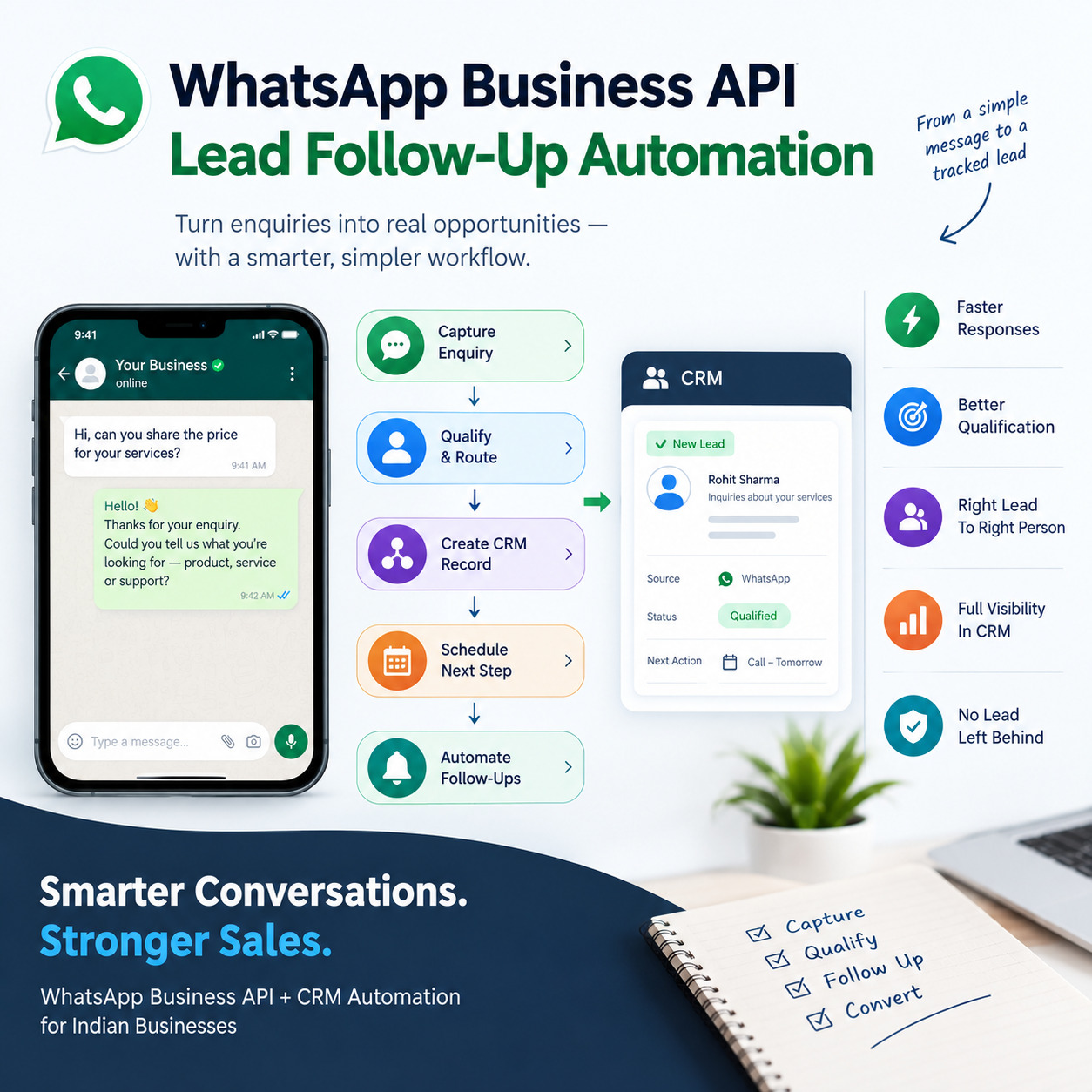
WhatsApp Business API automation can turn that unpredictable inbox into a structured sales workflow. It can respond to common first questions, collect qualification data, create CRM records, schedule the next step and alert a human when judgment is required.
The objective is not to create a bot that talks forever. The objective is to make sure a valuable enquiry never gets lost because nobody knew what to do next.
Why WhatsApp needs a process behind it
Many businesses already use WhatsApp heavily, but usage alone is not automation.
A personal or small-team workflow often depends on the owner noticing messages, forwarding screenshots and asking employees for updates. That model breaks as lead volume increases.
The official WhatsApp Business platform enables businesses to connect messaging with software and team workflows. A platform such as SyncWABA can provide the messaging layer, while CRM, automation tools and business rules determine what should happen around each conversation.
The strongest implementations therefore begin with process design, not with message templates.
Stage 1: acknowledge the enquiry without creating friction
A customer who has just clicked an ad should not be greeted with a ten-question form.
The first response should confirm that the business received the enquiry and make the next action easy. Depending on the use case, that may be a simple menu, one qualifying question or an invitation to choose between sales and support.
For a software company, the first question could ask what the customer wants to automate. For a property company, it could ask about location or property type. For an education business, it might ask which program the student is interested in.
The goal is to create momentum while collecting only information that will actually change the next step.
Stage 2: identify whether the person is a new lead or an existing customer
One of the most useful early automations is contact recognition.
When a message arrives, the system can check whether the phone number already exists in CRM or another customer database. If it is a known customer, the workflow can route the conversation differently from a new sales enquiry.
This avoids asking an existing customer introductory questions they have already answered.
It also prevents duplicate lead records and gives the team a more complete view of the relationship.
Stage 3: qualify with short, purposeful questions
Qualification should help salespeople, not irritate prospects.
A business needs to decide which facts meaningfully influence its next action. For a B2B service, useful fields may include company type, requirement, current tool, team size and urgency. A manufacturer may ask product, quantity and delivery location. A real-estate company may ask area, property type and budget range.
The best flow usually asks one question at a time and allows a human handoff at any point.
Free-text AI can help interpret answers, but important fields should be written into structured CRM fields so the information can be used later for routing and reporting.
Stage 4: assign ownership automatically
Once the system understands the enquiry, it can determine who should handle it.
A lead can be assigned by region, product, department, language or round-robin logic. The responsible salesperson receives a notification with the context already collected.
The CRM or lead database should store the assigned owner.
If the business has an expected response time, an escalation rule can monitor whether the lead was actually handled. Automation is most valuable when it not only assigns the work but also makes unhandled work visible.
Stage 5: connect every conversation to CRM
A WhatsApp chat is useful to the salesperson, but management needs structured data.
The CRM record should capture the source, qualification fields, conversation status, owner and next action. If a lead already exists, the workflow should update it rather than create another record.
When the customer responds after a follow-up, the CRM can record fresh activity and notify the owner.
This connection prevents a common problem: the sales pipeline says “No Response” even though the customer has been actively chatting on WhatsApp.
Stage 6: offer a clear next step
Automation works best when it helps the customer progress.
After qualification, the next step might be a demo, consultation, site visit, payment link, catalogue, document upload or callback.
The conversation should make that action obvious.
For appointment-driven businesses, scheduling can be integrated so the customer selects an available slot. Once confirmed, the CRM is updated and the relevant salesperson or consultant receives the meeting details.
For product enquiries, the system can send only the most relevant brochure or catalogue instead of dumping multiple files into the chat.
Stage 7: create context-aware follow-up
Follow-up is where automation can become either useful or annoying.
The wrong approach is a fixed sequence that continues no matter what the customer does.
The better approach checks the current state before each action. If the customer booked a meeting, the previous reminder stops. If the person asked for a callback next week, the system waits. If the lead is marked not interested, the active sales sequence ends.
A follow-up workflow may include internal tasks, customer messages or both.
The CRM should decide whether the customer still needs a message. The messaging platform should deliver it through the approved channel.
Stage 8: hand over to a human at the right moment
Human handoff is not a failure of automation. It is a design requirement.
A lead should move to a person when the customer requests it, when the request is unusual, when negotiation begins, when the prospect is high-value or when the system is not confident about the intent.
The handoff should include a summary so the salesperson does not start with “Please explain again.”
This is an excellent place for AI. It can convert a long conversation into a short brief containing requirement, urgency, questions asked and next expected action.
The human then continues from a stronger starting point.
Stage 9: manage enquiries outside business hours
After-hours automation is useful because customers do not always enquire during office time.
The system can acknowledge the message, collect basic information and set a clear expectation about when a person will respond. It may also allow the customer to book a future meeting.
The message should not pretend that a human is present when one is not.
Transparency builds trust and still gives the business structured information to act on when the team returns.
Stage 10: reactivate leads without blasting everyone
A company may have thousands of old WhatsApp contacts, but that does not mean every contact should receive the same campaign.
A CRM-connected system can segment leads by previous interest, stage, last activity and source.
For example, prospects who requested a demo but never attended can be treated differently from prospects who purchased one year ago.
Reactivation works best when it gives the customer a relevant reason to restart the conversation.
If the person replies, the old campaign logic should stop and the lead should return to an active owner.
Useful WhatsApp automation flows by industry
Real estate
A property enquiry can be qualified by project, location, property size and budget. The system can send the correct brochure, offer a site-visit booking and alert the assigned sales advisor.
Education
An institute can collect course interest, academic level and preferred counselling time before transferring the lead to admissions. Follow-up can be tied to counselling or application status rather than generic reminders.
Ecommerce
Customer communication can include order confirmations, shipping updates, support triage and selected catalogue journeys. Sales and support events should come from the ecommerce or order-management system so messages reflect current data.
Healthcare administration
WhatsApp can support appointment-related and administrative workflows. Sensitive medical decisions should remain with qualified professionals, and data handling should match the sensitivity of the information involved.
B2B services
Agencies, consultants and software companies can use WhatsApp for qualification, demo booking, document collection and sales follow-up. The biggest benefit is often reducing the time between “I am interested” and a meaningful human conversation.
Where AI genuinely helps
AI is useful when customers write naturally instead of clicking fixed buttons.
It can classify intent, extract fields from free text, summarize chat history and draft answers. It can also identify when the conversation no longer fits a standard flow.
However, AI should not be allowed to invent pricing, contractual terms or business commitments.
A safer architecture uses AI for understanding and drafting, while deterministic rules control critical actions.
This combination gives flexibility without giving up operational control.
What should be measured
A WhatsApp automation project should be evaluated like a sales system, not like a messaging experiment.
Useful measurements include time to first meaningful response, percentage of enquiries successfully assigned, percentage of leads with a next action, qualification completion rate, meeting-booking rate, human handoff rate and conversion by lead source.
You can also track where customers drop out of the flow. If many people stop answering after the third question, the qualification journey may be too long.
The objective is to improve movement through the customer journey.
Common mistakes that make WhatsApp automation perform badly
The first mistake is building a chatbot before defining the sales process.
The second is using the same flow for every lead source.
The third is asking for too much information too early.
The fourth is continuing automated follow-ups after the customer’s situation has changed.
The fifth is creating a separate WhatsApp database instead of integrating with CRM.
The sixth is making the human handoff difficult.
The seventh is focusing on message volume instead of qualified conversations and revenue outcomes.
A practical implementation roadmap
Begin with one high-volume enquiry type.
Write down the first five actions a good salesperson currently performs. Identify which of those actions follow clear rules and which require judgment.
Automate the predictable parts: acknowledgement, basic qualification, CRM record creation, ownership and scheduling.
Keep negotiation and exception handling human.
Then run the workflow with real enquiries and review transcripts. Look for places where customers become confused or where salespeople still need to re-enter data.
Improve the flow before adding more use cases.
This approach creates a stable foundation that can later support campaigns, support automation, payment reminders and industry-specific journeys.
How SyncWABA and InfoTechBrains fit into the workflow
SyncWABA is InfoTechBrains’ WhatsApp Business platform for businesses that want messaging, automation, CRM-oriented workflows and AI-assisted customer engagement on official WhatsApp infrastructure.
InfoTechBrains can also build the surrounding CRM, Google Sheets, n8n and custom-software integrations needed to make WhatsApp part of a larger business process.
That matters because messaging alone does not solve lead leakage. The full workflow must connect acquisition, qualification, ownership, follow-up and human sales activity.
Frequently asked questions
Can WhatsApp automatically qualify a lead?
Yes. A structured flow can collect required information, and AI can help interpret free-text answers. Important fields should still be stored in CRM or another structured system.
Can WhatsApp follow-up stop when a customer replies?
It should. A well-designed workflow checks the latest conversation and CRM state before continuing a sequence.
Can WhatsApp appointments be booked automatically?
Yes. The workflow can connect with a calendar or booking system and update the lead record once a slot is confirmed.
Do we need a CRM before automating WhatsApp?
A full CRM is not mandatory for a very small setup, but the business should have a structured source of truth for lead ownership, stage and next action. That could be a CRM or a carefully designed lead database.
Should an AI chatbot answer every customer question?
No. AI is useful for common questions and interpretation, but pricing commitments, complaints, negotiations and sensitive cases should have clear human-handoff rules.
Conclusion
The best WhatsApp automation feels less like a bot and more like an organized sales operation.
The customer gets a fast response and a clear next step. The salesperson receives context instead of an empty lead. Management sees ownership and follow-up status. The CRM remains current without requiring employees to retype the same information.
That is the real value of WhatsApp Business API automation.
If your business already receives leads on WhatsApp but follow-up depends on individual memory, InfoTechBrains and SyncWABA can help turn those conversations into a structured, trackable sales workflow.
About the author
InfoTechBrains Team
Technology expert focused on software architecture, automation, and digital transformation.
View profile & all posts →